




아이디 저장

이전 페이지

이전 페이지 내용에 이어서 진행합니다.
Code

Preview
1.
로그인 화면
2.
메인 화면
작업 프로세스
1.
프로젝트 생성
2.
프로젝트 설정
3.
스프링 시큐리티 설정
4.
요청 경로 매핑
Preview
로그인 화면
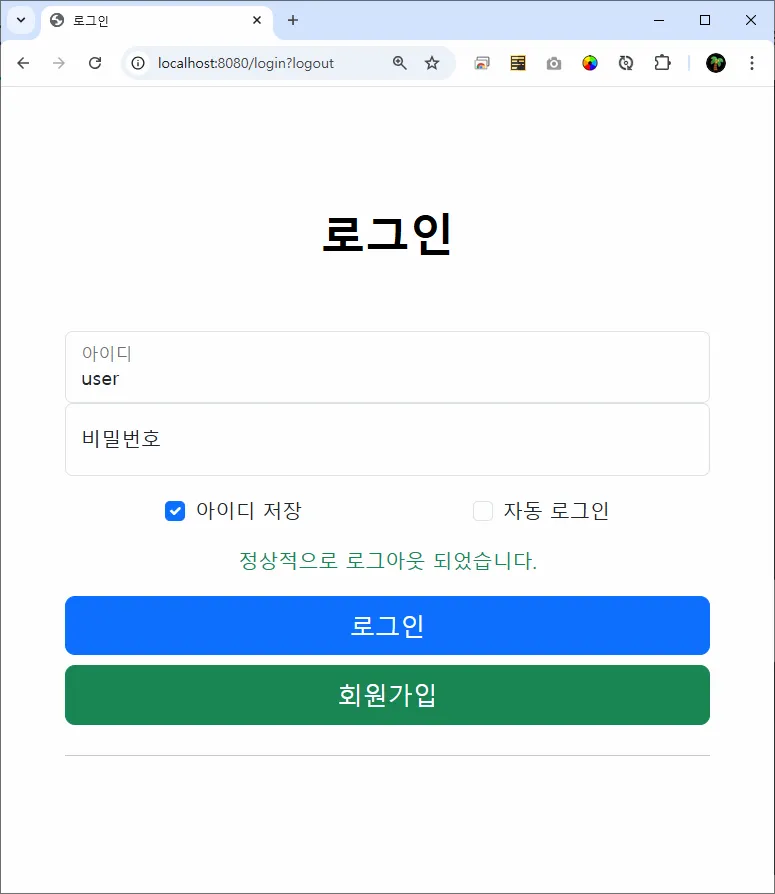
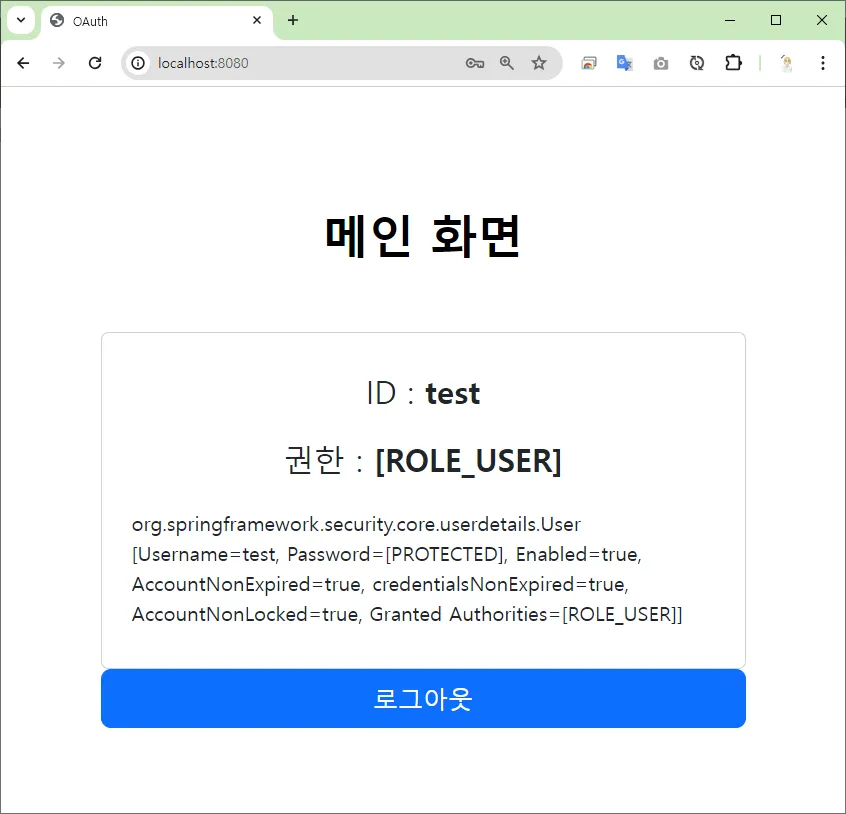
메인 화면
작업 프로세스
1.
프로젝트 생성
2.
프로젝트 설정
3.
로그인 성공 처리 클래스 생성
a.
 아이디 저장 체크 여부 확인
i.
아이디 쿠키 생성ii.
 아이디 쿠키 삭제
4.
로그인 컨트롤러 메소드
a.
 아이디 쿠키 가져오기
프로젝트 생성
 프로젝트 생성 (이전 페이지)
 build.gradle
spring boot 3.x.x spring security 6.x.xplugins {
id 'java'
id 'war'
id 'org.springframework.boot' version '3.3.5'
id 'io.spring.dependency-management' version '1.1.6'
}
group = 'com.aloha'
version = '0.0.1-SNAPSHOT'
java {
toolchain {
languageVersion = JavaLanguageVersion.of(17)
}
}
configurations {
compileOnly {
extendsFrom annotationProcessor
}
}
repositories {
mavenCentral()
}
dependencies {
implementation 'org.springframework.boot:spring-boot-starter-security'
implementation 'org.springframework.boot:spring-boot-starter-thymeleaf'
implementation 'org.springframework.boot:spring-boot-starter-web'
implementation 'org.mybatis.spring.boot:mybatis-spring-boot-starter:3.0.3'
implementation 'org.thymeleaf.extras:thymeleaf-extras-springsecurity6'
compileOnly 'org.projectlombok:lombok'
developmentOnly 'org.springframework.boot:spring-boot-devtools'
runtimeOnly 'com.mysql:mysql-connector-j'
annotationProcessor 'org.projectlombok:lombok'
providedRuntime 'org.springframework.boot:spring-boot-starter-tomcat'
testImplementation 'org.springframework.boot:spring-boot-starter-test'
testImplementation 'org.mybatis.spring.boot:mybatis-spring-boot-starter-test:3.0.3'
testImplementation 'org.springframework.security:spring-security-test'
testRuntimeOnly 'org.junit.platform:junit-platform-launcher'
}
tasks.named('test') {
useJUnitPlatform()
}
Java
복사
프로젝트 설정
application.properties
spring.application.name=form-custom
# 데이터 소스 - MySQL
spring.datasource.driver-class-name=com.mysql.cj.jdbc.Driver
spring.datasource.url=jdbc:mysql://127.0.0.1:3306/aloha?serverTimezone=Asia/Seoul&allowPublicKeyRetrieval=true&useSSL=false&autoReconnection=true&autoReconnection=true
spring.datasource.username=aloha
spring.datasource.password=123456
# Mybatis 설정
mybatis.configuration.map-underscore-to-camel-case=true
mybatis.type-aliases-package=com.aloha.security6.domain
mybatis.mapper-locations=classpath:mybatis/mapper/**/**.xml
Markdown
복사
로그인 성공 처리 클래스 생성
1.
아이디 저장 체크 여부 확인a.
아이디 쿠키 생성b.
아이디 쿠키 삭제LoginSuccessHandler.java
/**
* 로그인 성공 처리 이벤트 핸들러
*/
@Slf4j
@Component
public class LoginSuccessHandler extends SavedRequestAwareAuthenticationSuccessHandler {
/**
* 로그인 성공 시 호출되는 메소드
* 🍪 아이디 저장 쿠키 생성
* 🔐 로그인 후 이전 페이지로 리다이렉트
*/
@Override
public void onAuthenticationSuccess(HttpServletRequest request
, HttpServletResponse response
, Authentication authentication) throws ServletException, IOException {
log.info("로그인 성공...");
// 아이디 저장
String rememberId = request.getParameter("remember-id"); // ✅ 아이디 저장 여부
String username = request.getParameter("id"); // 👩💼 아이디
log.info("rememberId : " + rememberId);
log.info("username : " + username);
// 아이디 저장 체크 ✅
if( rememberId != null && rememberId.equals("on") ) {
Cookie cookie = new Cookie("remember-id", username); // 쿠키에 아이디 등록
cookie.setMaxAge(60 * 60 * 24 * 7); // 유효기간 : 7일
cookie.setPath("/");
response.addCookie(cookie);
}
// 아이디 저장 체크 ❌
else {
Cookie cookie = new Cookie("remember-id", username); // 쿠키에 아이디 등록
cookie.setMaxAge(0); // 유효기간 : 0 (삭제)
cookie.setPath("/");
response.addCookie(cookie);
}
// 인증된 사용자 정보
CustomUser customUser = (CustomUser) authentication.getPrincipal();
Users user = customUser.getUser();
log.info("아이디 : " + user.getUsername());
log.info("비밀번호 : " + user.getPassword());
log.info("권한 : " + user.getAuthList());
super.onAuthenticationSuccess(request, response, authentication);
}
}
Java
복사
로그인 컨트롤러 메소드
1.
아이디 쿠키 가져오기HomeController.java
/**
* 로그인 화면
* @return
*/
@GetMapping("/login")
public String login(@CookieValue(value="remember-id", required = false) Cookie cookie
,Model model ) {
// @CookieValue(value="쿠키이름", required = 필수여부)
// - required=true (default) : 쿠키를 필수로 가져와서 없으면 에러
// - required=false : 쿠키 필수 ❌ ➡ 쿠키가 없으면 null, 에러❌
log.info(":::::::::: 로그인 페이지 ::::::::::");
String username = "";
boolean rememberId = false;
if( cookie != null ) {
log.info("CookieName : " + cookie.getName());
log.info("CookieValue : " + cookie.getValue());
username = cookie.getValue();
rememberId = true;
}
model.addAttribute("username", username);
model.addAttribute("rememberId", rememberId);
return "/login";
}
Java
복사
login.html
<!DOCTYPE html>
<html xmlns:th="http://www.thymeleaf.org"
xmlns:sec="http://www.thymeleaf.org/thymeleaf-extras-springsecurity5">
<head>
<meta charset="UTF-8">
<meta name="viewport" content="width=device-width, initial-scale=1.0">
<title>로그인</title>
<!-- bootstrap css -->
<link href="https://cdn.jsdelivr.net/npm/bootstrap@5.3.1/dist/css/bootstrap.min.css" rel="stylesheet">
</head>
<body>
<div class="container col-12 col-md-6 col-lg-4">
<div class="px-4 py-5 mt-5 text-center">
<h1 class="display-5 fw-bold text-body-emphasis">로그인</h1>
</div>
<!-- 로그인 영역 -->
<main class="form-signin login-box w-100 m-auto">
<form action="/login" method="post">
<!-- CSRF TOKEN -->
<input type="hidden" th:name="${_csrf.parameterName}" th:value="${_csrf.token}">
<div class="form-floating">
<input type="text" class="form-control" id="username" name="id" value="" placeholder="아이디"
autofocus th:value="${username}">
<label for="username">아이디</label>
</div>
<div class="form-floating">
<input type="password" class="form-control" id="password" name="pw" placeholder="비밀번호">
<label for="password">비밀번호</label>
</div>
<div class="form-check text-start my-3 d-flex justify-content-around">
<div class="item">
<input class="form-check-input" type="checkbox" name="remember-id" id="remember-id-check" th:checked="${rememberId}">
<label class="form-check-label" for="remember-id-check">아이디 저장</label>
</div>
<div class="item">
<input class="form-check-input" type="checkbox" name="auto-login" id="remember-me-check">
<label class="form-check-label" for="remember-me-check">자동 로그인</label>
</div>
</div>
<!-- 로그인 에러 -->
<th:block th:if="${param.error}">
<p class="text-center text-danger">아이디 또는 비밀번호를 잘못 입력했습니다.</p>
</th:block>
<!-- 로그아웃 완료 -->
<th:block th:if="${param.logout}">
<p class="text-center text-success">정상적으로 로그아웃 되었습니다.</p>
</th:block>
<!-- 버튼 -->
<div class="d-grid gap-2">
<button class="btn btn-lg btn-primary w-100 py-2" type="submit">로그인</button>
<a href="/join" class="btn btn-lg btn-success w-100 py-2">회원가입</a>
<hr>
</div>
</form>
</main>
</div>
<!-- bootstrap -->
<script src="https://cdn.jsdelivr.net/npm/bootstrap@5.3.1/dist/js/bootstrap.bundle.min.js"></script>
</body>
</html>
HTML
복사