




메서드 권한 관리

스프링 시큐리티 설정 클래스가 아닌,
컨트롤러 요청 메소드에서 메소드 수준에서의 권한을 관리하는 방법
적용방법
•
스프링 시큐리티 설정 클래스(SecurityConfig.java)
◦
@EnableMethodSecurity (spring boot 3.2~)
◦
@EnableGlobalMethodSecurity (spring boot ~3.2)
•
컨트롤러 메소드에 권한 제어
◦
@Secured
◦
@PreAuthorize
◦
@PostAuthorize
스프링 시큐리티 설정 클래스(SecurityConfig.java)
•
@EnableMethodSecurity (spring boot 3.2~)
•
@EnableGlobalMethodSecurity (spring boot ~3.2)
@EnableMethodSecurity

spring boot 3.2 버전 부터는
@EnableGlobalMethodSecurity 는 depreacated
@EnableMethodSecurity 권장
메소드 수준에서의 보안 설정 기능을 활성화하는 어노테이션
주요 속성
속성 | 설명 | 사용 예제 |
securedEnabled | @Secured 어노테이션
활성화
- 역할(Role) 기반 접근 제어를 가능하게 함 | @Secured("ROLE_ADMIN") |
prePostEnabled | @PreAuthorize 및 @PostAuthorize 어노테이션을 활성화
- 표현식 기반 제어를 가능하게 함 | @PreAuthorize("hasRole('ADMIN')")
@PostAuthorize("returnObject.username == authentication.name") |
securedEnabled = true
역할(Role; 권한) 기반으로 간단한 권한 제어
@Slf4j
@Configuration
@EnableWebSecurity
@EnableMethodSecurity(securedEnabled = true)
public class SecurityConfig {
Java
복사
@Secured("ROLE_USER")
@GetMapping("/path/to")
public String getMethod() {
}
Java
복사
ROLE_USER, ROLE_ADMIN 등의 권한을 가진 사용자 요청만 처리가 되도록 필터링하게 됩니다.
prePostEnabled = true
@Slf4j
@Configuration
@EnableWebSecurity
@EnableMethodSecurity(prePostEnabled = true)
public class SecurityConfig {
}
Java
복사
@PreAuthorize("hasRole('ADMIN')")
@GetMapping("/path/to")
public String getMethod() {
}
Java
복사
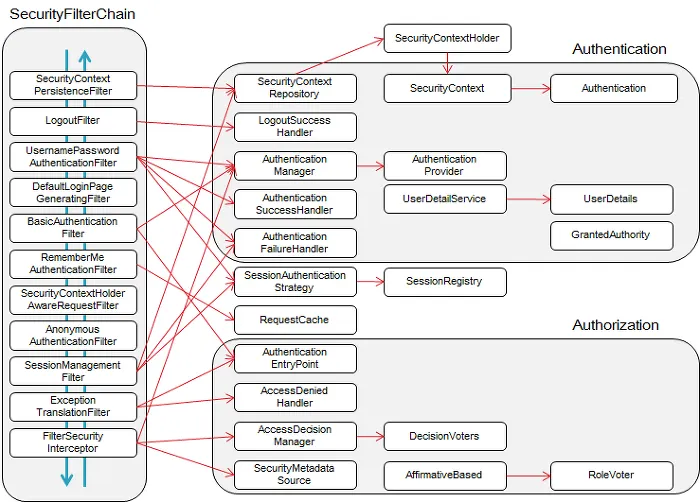
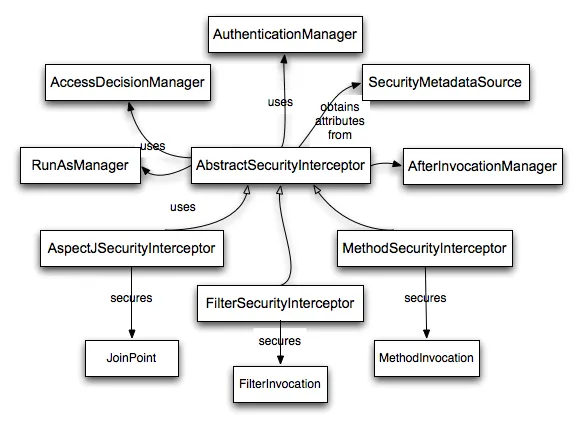
적용되는 주요 필터
•
MethodSecurityInterceptor
◦
메소드 보안을 실제로 수행하는 핵심 필터입니다.
◦
@Secured와 같은 어노테이션의 권한 제어를 처리하며, 메소드 호출 전에 인증된 사용자의 권한을 확인합니다.
•
FilterSecurityInterceptor
◦
Spring Security의 HTTP 요청 보안 필터로, 메소드 보안보다는 URL 패턴 기반의 접근 제어를 처리합니다.
@EnableGlobalMethodSecurity
spring boot 3.2 버전 부터는
@EnableGlobalMethodSecurity 는 depreacated
@EnableMethodSecurity 권장
메소드 수준에서의 보안 설정 기능을 활성화하는 어노테이션
컨트롤러 메소드에 권한 제어
•
@Secured
•
@PreAuthorize
•
@PostAuthorized
어노테이션 | 적용 시점 | 주요 특징 |
@Secured | 메소드 호출 전 | - 역할(Role) 기반의 간단한 보안.
- ROLE_ 접두사 필요
- SpEL 미지원. |
@PreAuthorize | 메소드 호출 전 | - SpEL을 사용한 표현식 기반 보안.
- 동적 권한 검사 및 복잡한 조건 처리 가능. |
@PostAuthorize | 메소드 호출 후 | - 반환값을 기반으로 보안 검사.
- SpEL 지원.
- 반환값 기반의 조건 처리 가능. |
@Secured
단순한 역할(Role) 기반 권한 검사
- 요청 앞 단에서 권한제어
@Controller
@RequestMapping("/board")
public class BoardController {
// 사용자 권한(ROLE_USER)를 가진 사용자 요청만 처리한다.
@Secured("ROLE_USER")
@GetMapping("/{id}")
public String getBoard(@PathVariable("id") String id) {
...
}
}
Java
복사
@PreAuthorize
단순 권한 검사 및 SpEL(스프링 표현식)을 기반으로 복잡한 조건의 권한 검사
- 요청 앞 단에서 권한제어
@Controller
@RequestMapping("/board")
public class BoardController {
// 사용자 권한(ROLE_USER)를 가진 사용자 요청만 처리한다.
@PreAuthorize("hasRole('USER')")
// 사용자 권한(ROLE_USER), 관리자 권한(ROLE_ADMIN)를 가진 사용자 요청만 처리한다.
// @PreAuthorize("hasAnyRole('USER', 'ADMIN')")
@GetMapping("/{id}")
public String getBoard(@PathVariable("id") String id) {
...
}
}
Java
복사
@PostAuthorized
단순 권한 검사 및 SpEL(스프링 표현식)을 기반으로 복잡한 조건의 권한 검사
- 메소드 실행 후 반환 값에 대한 권한 검사
•
요청 자원(게시글)에 대해서 작성자만 조회가 가능한 경우
@RestController
@RequestMapping("/board")
public class BoardController {
@Autowried BoardService boardService;
// 반환된 게시글 객체의 userNo 와 인증된 사용자의 User.no 가 일치하는지 확인
@PostAuthorize("returnObject.userNo == authentication.principal.user.no")
@GetMapping("/{id}")
public Board getBoard(@PathVariable("id") String id) {
Board board = boardService.select(id);
String userNo = board.getUserNo();
return board;
}
}
Java
복사
•
응답 결과
◦
작성자 본인인 경우, 요청한 게시글 정보가 응답
◦
작성자 본인이 아닌 경우, 403 Forbidden 에러 응답
•
returnObject
◦
요청 컨트롤러 메소드에서 반환하는 객체를 참조하는 키워드
◦
여기서는, return board; Board 타입의 게시글 정보 객체를 가리킨다.
SpEL( Spring Expression Language ) 권한 제어 함수
함수 | 설명 | 사용 예시 |
hasRole('role') | 사용자 권한이 지정된 역할(role)인지 확인.
ROLE_ 접두사 생략가능
ROLE_ 접두사가 자동으로 붙음 | @PreAuthorize("hasRole('ADMIN')") |
hasAuthority('authority') | 사용자 권한이 지정된 권한(authority)인지 확인.
ROLE_ 접두사 포함 | @PreAuthorize("hasAuthority('ROLE_USER')") |
isAuthenticated() | 사용자가 인증된 상태인지 확인. (로그인 여부) | @PreAuthorize("isAuthenticated()") |
isAnonymous() | 사용자가 익명(비인증) 상태인지 확인. | @PreAuthorize("isAnonymous()") |
permitAll() | 모든 사용자가 접근할 수 있도록 허용. | @PreAuthorize("permitAll()") |
denyAll() | 모든 사용자의 접근을 거부. | @PreAuthorize("denyAll()") |
hasPermission(target, permission) | 특정 대상에 대해
특정 권한(permission)을 가지고 있는지 확인. | @PreAuthorize("hasPermission(#post, 'EDIT')") |
principal | 현재 인증된 사용자의 principal을 참조. | @PreAuthorize("principal.username == 'admin'") |
권한 제어 예시
•
소유자 검증 로직
•
게시글 등록
•
게시글 조회
•
게시글 수정
•
게시글 삭제
소유자 검증 로직
public interface BoardService {
...
// 소유자 확인
public boolean isOwner(String id, Long userNo) throws Exception;
...
}
Java
복사
@Slf4j
@Service("BoardService") // ⭐ 빈 이름을 BoardService 로 지정
public class BoardServiceImpl implements BoardService {
...
/**
* @param id : 게시글 id, userNo : 회원 no (PK)
* 게시글 id로 작성자 userNo 를 조회하여,
* 인증된 사용자 no 와 일치하는지 확인
*/
@Override
public boolean isOwner(String id, Long userNo) throws Exception {
log.info("isOwner - id : " + id);
log.info("isOwner - userNo : " + userNo);
Board board = select(id);
Long boardUserNo = board.getUserNo();
if( userNo != null && userNo == boardUserNo ) {
return true;
}
return false;
}
}
Java
복사
게시글 등록
인증된 사용자, 즉 회원만 게시글을 등록할 수 있다.
@Controller
@RequestMapping("/board")
public class BoardController {
// 게시글 등록 화면
@Secured("ROLE_USER") // 사용자 권한(ROLE_USER)인 경우
//@PreAuthorize("hasRole('USER')") // 사용자 권한(ROLE_USER)인 경우
//@PreAuthorize("isAuthenticated()") // 인증된 사용자 인 경우
//@PreAuthorize("isAuthenticated() and hasRole('ADMIN')") // 인증 + 관리자인 경우
@GetMapping("/insert")
public String insert() {
...
}
// 게시글 등록 처리
@Secured("ROLE_USER") // 사용자 권한(ROLE_USER)인 경우
//@PreAuthorize("hasRole('USER')") // 사용자 권한(ROLE_USER)인 경우
//@PreAuthorize("isAuthenticated()") // 인증된 사용자 인 경우
//@PreAuthorize("isAuthenticated() and hasRole('ADMIN')") // 인증 + 관리자인 경우
@PostMapping("")
public String insertPost(Board board) {
...
}
}
Java
복사
게시글 조회
누구나 게시글을 조회할 수 있다.
@Controller
@RequestMapping("/board")
public class BoardController {
// 별도로 권한제어 안 함
@GetMapping("/{id}")
public String select(@PathVariable("id") String id) {
...
return "/board/select";
}
}
Java
복사
게시글 수정
작성자 본인 또는 관리자만 게시글 수정이 가능하다.
@Controller
@RequestMapping("/board")
public class BoardController {
@Autowried BoardService boardService;
// 수정 화면
// 👩💼 작성자 본인 👩🔧 관리자
@PreAuthorize(" hasRole('ADMIN') or (#p0 != null and @BoardService.isOwner(#p0, authentication.principal.user.no) )")
@GetMapping("/update/{id}")
public String update(@PathVariable("id") String id) {
Board board = boardService.select(id);
...
}
// 수정 처리
// 👩💼 작성자 본인 👩🔧 관리자
@PreAuthorize(" hasRole('ADMIN') or (#p0.id != null and @BoardService.isOwner(#p0.id, authentication.principal.user.no) )")
@ResponseBody
@PutMapping("")
public String update(@RequestBody Board board) {
Board board = boardService.update(board);
...
return "SUCCESS";
}
}
Java
복사

@PreAuthorize 어노테이션 안에서, SpEL 표현식을 사용하면,
#p0, #p1… 와 같은 형식으로 파라미터를 인덱스로 지정하여, 가져올 수 있습니다.
public String update(@PathVariable("id") String id) {
...
Java
복사
여기서 첫번째 (인덱스 0 ) 파라미터를 가져오려면, SpEL 표현식에서는 #p0 으로 지정해서 가져올 수 있습니다,
파라미터 - @PathVariable("id") String id
SpEL - #p0
id  #p0
#p0
#p0@BoardService.isOwner(#p0.id, authentication.principal.user.no)
Java
복사
SpEL 표현식 안에서,
"@빈이름.메소드" 형태로 특정 빈의 메소드를 호출할 수 있습니다.
여기에서는 메소드에 파라미터 id(게시글 id), 인증된 사용자 no 를 메소드로 전달하여 소유자인지 검증하고 여부를 true, false 로 반환받아 소유자를 메소드 호출 전에 권한 제어 할 수 있습니다.
게시글 삭제
작성자 본인 또는 관리자만 게시글 삭제가 가능하다.
@Controller
@RequestMapping("/board")
public class BoardController {
@Autowried BoardService boardService;
// 삭제 처리
// 👩💼 작성자 본인 👩🔧 관리자
@PreAuthorize("( hasRole('ADMIN')) or (#p0 != null and @BoardService.isOwner(#p0, authentication.principal.user.no))")
@ResponseBody
@DeleteMapping("/{id}")
public String update(@PathVariable("id") String id) {
Board board = boardService.delete(id);
...
return "SUCCESS";
}
}
Java
복사
인증된 사용자 권한이 관리(ROLE_ADMIN) 인지 검증합니다.
파라미터로 게시글 id 와 인증된 사용자 no 받아와 게시글 소유자를 확인합니다.
게시판 권한 제어
•
테이블 생성
◦
board.sql
board.sql
-- board : 게시글
DROP TABLE IF EXISTS `board`;
CREATE Table `board` (
`no` BIGINT AUTO_INCREMENT PRIMARY KEY COMMENT 'PK',
`id` VARCHAR(64) UNIQUE COMMENT 'UK',
`title` VARCHAR(100) NOT NULL COMMENT '제목',
-- `writer` VARCHAR(100) NOT NULL COMMENT '작성자',
`user_no` BIGINT NOT NULL COMMENT '회원번호(PK)',
`content` TEXT NULL COMMENT '내용',
`created_at` TIMESTAMP DEFAULT CURRENT_TIMESTAMP COMMENT '등록일자',
`updated_at` TIMESTAMP DEFAULT CURRENT_TIMESTAMP
ON UPDATE CURRENT_TIMESTAMP
COMMENT '수정일자',
FOREIGN KEY (user_no) REFERENCES `user`(no)
ON UPDATE CASCADE
ON DELETE CASCADE
) COMMENT '게시글';
SQL
복사
View
•
board/list.html
•
board/create.html
•
board/detail.html
•
board/update.html
•
board/list.html
<!DOCTYPE html>
<html lang="en">
<head>
<meta charset="UTF-8">
<meta name="viewport" content="width=device-width, initial-scale=1.0">
<title>게시판 프로젝트</title>
<link href="https://cdn.jsdelivr.net/npm/bootstrap@5.3.8/dist/css/bootstrap.min.css" rel="stylesheet">
</head>
<body>
<main>
<div class="container py-5">
<div class="row justify-content-center">
<div class="col-12">
<h1 class="text-center">게시글 목록</h1>
<div class="d-flex justify-content-end">
<a href="/board/create" class="btn btn-primary">글쓰기</a>
</div>
<table class="table table-bordered table-striped table-hover table-responsive mt-3 text-center">
<colgroup>
<col class="col-1"> <!-- 번호 -->
<col class="col-3"> <!-- 제목 -->
<col class="col-2"> <!-- 작성자 -->
<col class="col-2"> <!-- 등록일자 -->
<col class="col-2"> <!-- 수정일자 -->
</colgroup>
<tr class="table-dark">
<th width="150">번호</th>
<th width="300">제목</th>
<th>작성자</th>
<th>등록일자</th>
<th>수정일자</th>
</tr>
<th:block th:if="${ list == null || list.isEmpty() }">
<tr>
<td colspan="5">조회된 데이터가 없습니다.</td>
</tr>
</th:block>
<th:block th:each="board : ${list}">
<tr class="align-middle">
<td th:text="${board.no}">번호</td>
<td class="text-start">
<a th:href="|/board/detail?no=${board.no}|"
th:text="${board.title}">제목</a>
</td>
<td th:text="${board.writer}">작성자</td>
<td>
<span th:text="${ #dates.format( board.createdAt, 'yyyy-MM-dd HH:mm:ss' ) }">
등록일자
</span>
</td>
<td>
<span th:text="${ #dates.format( board.updatedAt, 'yyyy-MM-dd HH:mm:ss' ) }">
수정일자
</span>
</td>
</tr>
</th:block>
</table>
</div>
</div>
</div>
</main>
<script src="https://cdn.jsdelivr.net/npm/bootstrap@5.3.8/dist/js/bootstrap.bundle.min.js"></script>
</body>
</html>
HTML
복사
•
board/create.html
<!DOCTYPE html>
<html lang="ko">
<head>
<meta charset="UTF-8">
<meta name="viewport" content="width=device-width, initial-scale=1.0">
<title>게시판 프로젝트</title>
<link href="https://cdn.jsdelivr.net/npm/bootstrap@5.3.8/dist/css/bootstrap.min.css" rel="stylesheet">
</head>
<body>
<main>
<div class="container py-5">
<div class="row justify-content-center">
<div class="col-12 col-md-10 col-lg-6">
<h1 class="text-center">게시글 등록</h1>
<!-- action 제거 or 의미만 유지 -->
<form id="boardForm">
<div class="mb-3">
<label class="form-label">제목</label>
<input type="text" class="form-control" name="title" id="title" required>
</div>
<div class="mb-3">
<label class="form-label">작성자</label>
<input type="text" class="form-control" name="writer" id="writer" required>
</div>
<div class="mb-3">
<label class="form-label">내용</label>
<textarea class="form-control" name="content" id="content" rows="5"></textarea>
</div>
<div class="d-grid">
<button type="submit" class="btn btn-primary">등록</button>
</div>
</form>
</div>
</div>
</div>
</main>
<script src="https://cdn.jsdelivr.net/npm/bootstrap@5.3.8/dist/js/bootstrap.bundle.min.js"></script>
<script>
document.getElementById("boardForm").addEventListener("submit", async function (e) {
e.preventDefault(); // 기본 submit 막기
const data = {
title: document.getElementById("title").value,
writer: document.getElementById("writer").value,
content: document.getElementById("content").value
};
try {
const response = await fetch("/board/create", {
method: "POST",
headers: {
"Content-Type": "application/json"
},
body: JSON.stringify(data)
});
if (!response.ok) {
throw new Error("등록 실패");
}
const result = await response.json();
alert("게시글이 등록되었습니다.");
// 목록으로 이동
location.href = "/board/list";
} catch (error) {
alert(error.message);
}
});
</script>
</body>
</html>
HTML
복사
•
board/detail.html
<!DOCTYPE html>
<html lang="en">
<head>
<meta charset="UTF-8">
<meta name="viewport" content="width=device-width, initial-scale=1.0">
<title>게시판 프로젝트</title>
<link href="https://cdn.jsdelivr.net/npm/bootstrap@5.3.8/dist/css/bootstrap.min.css" rel="stylesheet">
</head>
<body>
<main>
<div class="container py-5">
<div class="row justify-content-center">
<div class="col-12 col-md-10 col-lg-6">
<h1 class="text-center">게시글 조회</h1>
<form action="/board/create" method="post" th:object="${board}">
<div class="mb-3">
<label for="" class="form-label">제목</label>
<input type="text" class="form-control" th:field="*{title}"
aria-describedby="helpTitle" placeholder="제목을 입력해주세요"
readonly
/>
</div>
<div class="mb-3">
<label for="" class="form-label">작성자</label>
<input type="text" class="form-control" th:field="*{writer}"
aria-describedby="helpWriter" placeholder="작성자를 입력해주세요"
readonly
/>
</div>
<div class="mb-3">
<label for="" class="form-label">내용</label>
<textarea class="form-control" th:field="*{content}" rows="5" readonly></textarea>
</div>
<div class="d-grid gap-2 d-md-flex justify-content-center">
<button type="button" class="btn btn-outline-primary w-100" onclick="moveList()">목록</button>
<button type="button" class="btn btn-primary w-100" onclick="moveUpdate()">수정</button>
</div>
</form>
</div>
</div>
</div>
</main>
<script src="https://cdn.jsdelivr.net/npm/bootstrap@5.3.8/dist/js/bootstrap.bundle.min.js"></script>
<script>
// 👩💻 모델 객체를 자바스크립트로 가져오는 방법
let no = '[[${board.no}]]'
// 목록 화면 이동
function moveList() {
location.href = '/board/list'
}
// 수정 화면 이동
function moveUpdate() {
location.href = '/board/update?no=' + no
}
</script>
</body>
</html>
HTML
복사
•
board/update.html
<!DOCTYPE html>
<html lang="en">
<head>
<meta charset="UTF-8">
<meta name="viewport" content="width=device-width, initial-scale=1.0">
<title>게시판 프로젝트</title>
<link href="https://cdn.jsdelivr.net/npm/bootstrap@5.3.8/dist/css/bootstrap.min.css" rel="stylesheet">
</head>
<body>
<main>
<div class="container py-5">
<div class="row justify-content-center">
<div class="col-12 col-md-10 col-lg-6">
<h1 class="text-center">게시글 수정</h1>
<form id="form" action="/board/update" method="post" th:object="${board}">
<input type="hidden" th:field="*{no}">
<div class="mb-3">
<label for="" class="form-label">제목</label>
<input type="text" class="form-control" th:field="*{title}"
aria-describedby="helpTitle" placeholder="제목을 입력해주세요"
required
/>
</div>
<div class="mb-3">
<label for="" class="form-label">작성자</label>
<input type="text" class="form-control" th:field="*{writer}"
aria-describedby="helpWriter" placeholder="작성자를 입력해주세요"
required
/>
</div>
<div class="mb-3">
<label for="" class="form-label">내용</label>
<textarea class="form-control" th:field="*{content}" rows="5"></textarea>
</div>
<div class="d-grid gap-2 d-md-flex justify-content-center mt-2">
<button type="submit" class="btn btn-primary w-100">수정</button>
</div>
<div class="d-grid gap-2 d-md-flex justify-content-center mt-2">
<button type="button" class="btn btn-outline-primary w-100" onclick="moveList()">목록</button>
<button type="button" class="btn btn-outline-danger w-100" onclick="actionDelete()">삭제</button>
</div>
</form>
</div>
</div>
</div>
</main>
<script src="https://cdn.jsdelivr.net/npm/bootstrap@5.3.8/dist/js/bootstrap.bundle.min.js"></script>
<script>
const form = document.getElementById("form");
form.addEventListener("submit", async (e) => {
e.preventDefault(); // 기본 submit 막기
const data = {
no: document.getElementById("no").value,
title: document.getElementById("title").value,
writer: document.getElementById("writer").value,
content: document.getElementById("content").value
};
try {
const response = await fetch("/board/update", {
method: "PUT", // 또는 POST
headers: {
"Content-Type": "application/json"
},
body: JSON.stringify(data)
});
if (!response.ok) throw new Error("수정 실패");
alert("게시글이 수정되었습니다.");
location.href = "/board/list";
} catch (err) {
alert(err.message);
}
});
async function actionDelete() {
if (!confirm("정말로 삭제하시겠습니까?")) return;
const no = document.getElementById("no").value;
try {
const response = await fetch(`/board/delete/${no}`, {
method: "DELETE"
});
if (!response.ok) throw new Error("삭제 실패");
alert("삭제되었습니다.");
location.href = "/board/list";
} catch (err) {
alert(err.message);
}
}
function moveList() {
location.href = "/board/list";
}
</script>
</body>
</html>
HTML
복사