





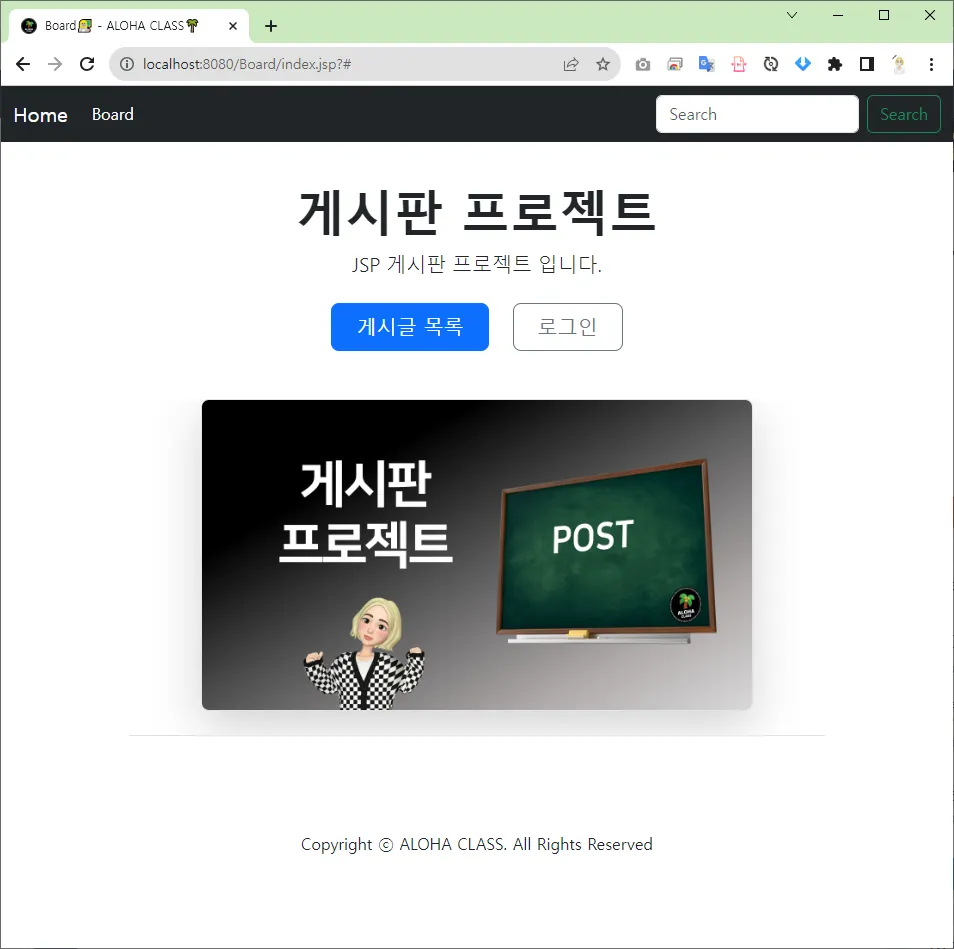
게시판 메인 화면
작업순서
1.
web.xml - <welcome-file-list> 태그 작성
2.
index.jsp 페이지 생성
3.
코드 작성
web.xml
<?xml version="1.0" encoding="UTF-8"?>
<web-app xmlns:xsi="http://www.w3.org/2001/XMLSchema-instance" xmlns="http://xmlns.jcp.org/xml/ns/javaee" xsi:schemaLocation="http://xmlns.jcp.org/xml/ns/javaee http://xmlns.jcp.org/xml/ns/javaee/web-app_4_0.xsd" id="WebApp_ID" version="4.0">
<display-name>Board</display-name>
<welcome-file-list>
<welcome-file>index.html</welcome-file>
<welcome-file>index.jsp</welcome-file>
<welcome-file>index.htm</welcome-file>
<welcome-file>default.html</welcome-file>
<welcome-file>default.jsp</welcome-file>
<welcome-file>default.htm</welcome-file>
</welcome-file-list>
</web-app>
HTML
복사
<welcome-file-list>
<welcome-file>초기 파일명</welcome-file>
</welcome-file-list>
설명
클라이언트가 웹 애플리케이션 루트 URL에 접근할 때 자동으로 표시되는 초기 페이지를 정의하는 데 사용됩니다.
여기서 웹 페이지 초기 화면을 설정하였기 때문에, 서버의 루트 경로에 접근했을 때 index.jsp 를 볼 수 있습니다.
index.jsp
<%@ page language="java" contentType="text/html; charset=UTF-8"
pageEncoding="UTF-8"%>
<!DOCTYPE html>
<html data-bs-theme="light">
<head>
<meta charset="UTF-8">
<jsp:include page="/layout/main/import/meta.jsp" />
<jsp:include page="/layout/main/import/link.jsp" />
</head>
<body>
<jsp:include page="/layout/main/UI/header.jsp" />
<div class="container">
<div class="px-4 pt-5 my-5 text-center border-bottom">
<h1 class="display-4 fw-bold">게시판 프로젝트</h1>
<div class="col-lg-6 mx-auto">
<p class="lead mb-4">JSP 게시판 프로젝트 입니다.</p>
<div class="d-grid gap-2 d-sm-flex justify-content-sm-center mb-5">
<button type="button" class="btn btn-primary btn-lg px-4 me-sm-3">게시글
목록</button>
<button type="button" class="btn btn-outline-secondary btn-lg px-4">로그인</button>
</div>
</div>
<div class="overflow-hidden">
<div class="container px-5">
<img src="https://i.imgur.com/pPxobUQ.jpg" class="img-fluid border rounded-3 shadow-lg mb-4" alt="게시판 프로젝트" width="700" height="500" loading="lazy">
</div>
</div>
</div>
</div>
<jsp:include page="/layout/main/UI/footer.jsp" />
<jsp:include page="/layout/main/import/script.jsp" />
</body>
</html>
HTML
복사
code
<jsp:include page="파일명.jsp" />
HTML
복사
설명
<jsp:include> 는 JSP 액션 태그로 외부 JSP 페이지 파일을 해당 파일에 포함시키는 태그입니다.
여기서는, meta.jsp, link.jsp, header.jsp, footer.jsp, script.jsp 를 포함시키고 있습니다. 이렇게 함으로써 또 새로운 화면을 개발할 때, 매번 공통적으로 쓰이는 영역의 태그를 중복 하여 작성하지 않아도 됩니다. 또한, 헤더 영역 수정 시, 다수의 중복된 코드를 번거롭게 수정하지 않아도 header.jsp 파일 하나만 수정하면 되기 때문에 유지보수하기 쉽고 생산성이 높아집니다. 이러한 작업을 템플릿 작업이라고 부릅니다.
메인화면을 완성하였습니다. 이제 게시판 프로젝트의 주요 기능들을 하나씩 개발해 나가보도록 하겠습니다.