





커스텀 로그인 페이지

이전 페이지

이전 페이지 내용에 이어서 진행합니다.
Code

Preview
1.
로그인 화면
2.
메인 화면
작업 프로세스
1.
프로젝트 생성
2.
프로젝트 설정
3.
스프링 시큐리티 설정
4.
요청 경로 매핑
Preview
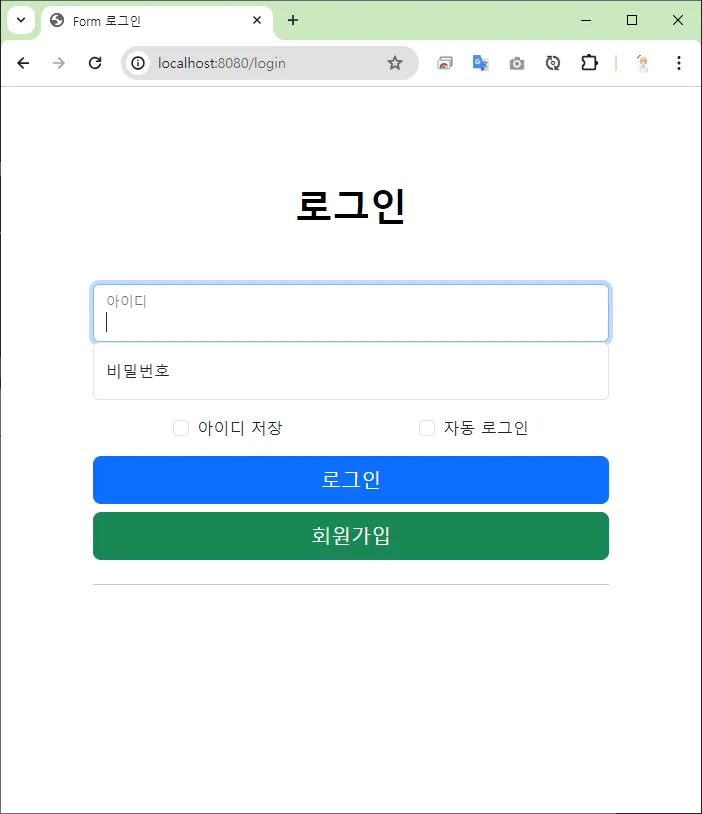
로그인 화면
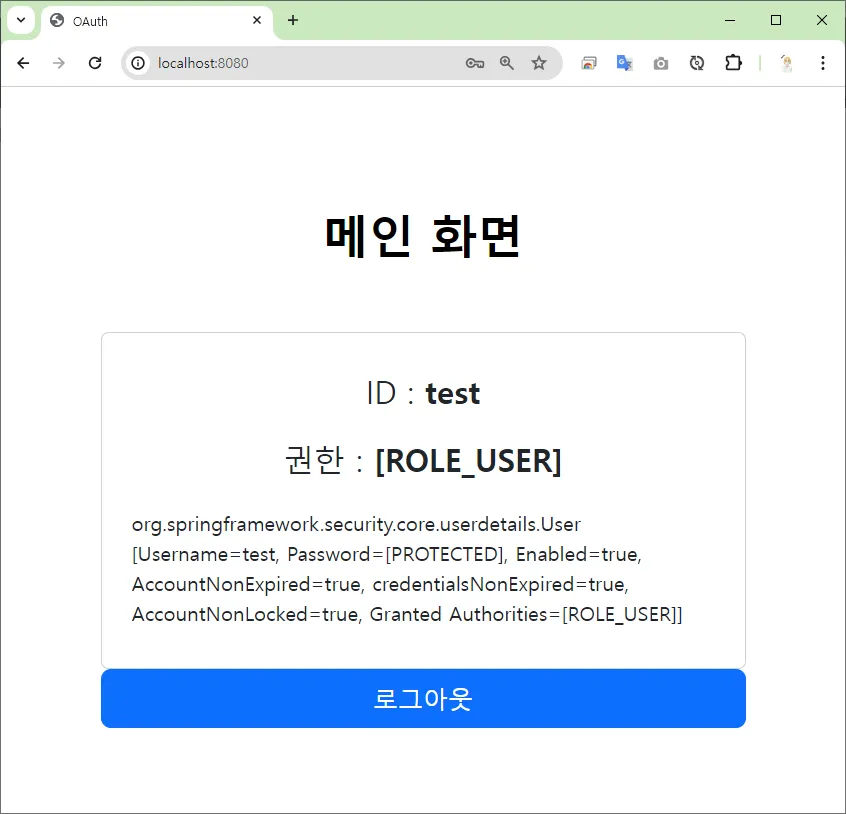
메인 화면
작업 프로세스
1.
프로젝트 생성
2.
프로젝트 설정
3.
스프링 시큐리티 설정
4.
요청 경로 매핑
프로젝트 생성
 프로젝트 생성 (이전 페이지)
 build.gradle
 spring boot 2.x.x spring security 5.x.x
plugins {
id 'java'
id 'war'
id 'org.springframework.boot' version '2.7.17'
id 'io.spring.dependency-management' version '1.0.15.RELEASE'
}
group = 'com.aloha'
version = '0.0.1-SNAPSHOT'
java {
sourceCompatibility = '17'
}
configurations {
compileOnly {
extendsFrom annotationProcessor
}
}
repositories {
mavenCentral()
}
dependencies {
implementation 'org.springframework.boot:spring-boot-starter-security'
implementation 'org.springframework.boot:spring-boot-starter-thymeleaf'
implementation 'org.springframework.boot:spring-boot-starter-web'
implementation 'org.mybatis.spring.boot:mybatis-spring-boot-starter:2.3.1'
implementation 'org.thymeleaf.extras:thymeleaf-extras-springsecurity5'
compileOnly 'org.projectlombok:lombok'
developmentOnly 'org.springframework.boot:spring-boot-devtools'
runtimeOnly 'com.mysql:mysql-connector-j'
annotationProcessor 'org.projectlombok:lombok'
providedRuntime 'org.springframework.boot:spring-boot-starter-tomcat'
testImplementation 'org.springframework.boot:spring-boot-starter-test'
testImplementation 'org.mybatis.spring.boot:mybatis-spring-boot-starter-test:2.3.1'
testImplementation 'org.springframework.security:spring-security-test'
testRuntimeOnly 'org.junit.platform:junit-platform-launcher'
}
tasks.named('test') {
useJUnitPlatform()
}
Java
복사
프로젝트 설정
application.properties
spring.application.name=form-custom
# 데이터 소스 - MySQL
spring.datasource.driver-class-name=com.mysql.cj.jdbc.Driver
spring.datasource.url=jdbc:mysql://127.0.0.1:3306/aloha?serverTimezone=Asia/Seoul&allowPublicKeyRetrieval=true&useSSL=false&autoReconnection=true&autoReconnection=true
spring.datasource.username=aloha
spring.datasource.password=123456
# Mybatis 설정
mybatis.configuration.map-underscore-to-camel-case=true
mybatis.type-aliases-package=com.aloha.form_custom.domain
mybatis.mapper-locations=classpath:mybatis/mapper/**/**.xml
Markdown
복사
스프링 시큐리티 설정
•
SecurityConfig.java
커스텀 로그인 페이지 경로와 로그인 처리 경로를 지정합니다.
메소드 | 설명 |
loginPage(”/경로”) | - “/경로” 를 로그인 화면 경로로 지정합니다. 이 경로를 지정하면 스프링 시큐리티의 기본 로그인 화면은 더 이상 제공되지 않습니다.
- [GET] 방식으로 로그인 화면의 엔드포인트를 지정해야합니다. |
loginProcessingUrl(”/경로” ) | - “/경로” 를 로그인 처리 요청 경로로 지정합니다. 지정하지 않은 경우, 기본 경로는 [POST] 방식의 “/login” 경로로 지정되어 있습니다.
- form 태그의 action=”/경로” 를 일치하도록 작성해야합니다. |
// 🔐 폼 로그인 설정
// ✅ 커스텀 로그인 페이지
http.formLogin(login -> login.loginPage("/login")
.loginProcessingUrl("/login"));
Java
복사
SecurityConfig.java
@Slf4j
@Configuration
@EnableWebSecurity
public class SecurityConfig {
@Autowired
private DataSource dataSource;
@Autowired
private UserDetailServiceImpl userDetailServiceImpl;
// 스프링 시큐리티 설정 메소드
@Bean
public SecurityFilterChain securityFilterChain(HttpSecurity http) throws Exception {
// ✅ 인가 설정
http.authorizeRequests(requests -> requests
.antMatchers("/**").permitAll()
.anyRequest().permitAll()
);
// 🔐 폼 로그인 설정
// ✅ 커스텀 로그인 페이지
http.formLogin(login -> login.loginPage("/login")
.loginProcessingUrl("/login"));
// ✅ 사용자 정의 인증 설정
http.userDetailsService(userDetailServiceImpl);
// 🔄 자동 로그인 설정
http.rememberMe(me -> me.key("aloha")
.tokenRepository(tokenRepository())
.tokenValiditySeconds(60 * 60 * 24 * 7));
return http.build();
}
/**
* 🍃 자동 로그인 저장소 빈 등록
* ✅ 데이터 소스
* ⭐ persistent_logins 테이블 생성
create table persistent_logins (
username varchar(64) not null
, series varchar(64) primary key
, token varchar(64) not null
, last_used timestamp not null
);
* 🔄 자동 로그인 프로세스
* ✅ 로그인 시
* ➡ 👩💼(ID, 시리즈, 토큰) 저장
* ✅ 로그아웃 시,
* ➡ 👩💼(ID, 시리즈, 토큰) 삭제
* @return
*/
@Bean
public PersistentTokenRepository tokenRepository() {
// JdbcTokenRepositoryImpl : 토큰 저장 데이터 베이스를 등록하는 객체
JdbcTokenRepositoryImpl repositoryImpl = new JdbcTokenRepositoryImpl();
// ✅ 토큰 저장소를 사용하는 데이터 소스 지정
// - 시큐리티가 자동 로그인 프로세스를 처리하기 위한 DB를 지정합니다.
repositoryImpl.setDataSource(dataSource);
// persistent_logins 테이블 생성
try {
repositoryImpl.getJdbcTemplate().execute(JdbcTokenRepositoryImpl.CREATE_TABLE_SQL);
}
catch (BadSqlGrammarException e) {
log.error("persistent_logins 테이블이 이미 존재합니다.");
}
catch (Exception e) {
log.error("자동 로그인 테이블 생성 중 , 예외 발생");
}
return repositoryImpl;
}
}
Java
복사
로그인 요청 파라미터
요청 파라미터를 스프링 시큐리티 설정에서 변경할 수 있습니다.
•
기본 요청 파라미터
요소 | 요청 파라미터 |
아이디 | username |
비밀번호 | password |
자동 로그인 | remember-me |
요청 파라미터 변경하는 방법
•
아이디/비밀번호 요청 파라미터
•
자동 로그인 파라미터
아이디/비밀번호 요청 파라미터
http.formLogin(login -> login.loginPage("/login")
.loginProcessingUrl("/login")
.usernameParameter("id")
.passwordParameter("pw")
);
Java
복사
•
usernameParameter(”아이디 요청 파라미터”)
•
passwordParameter(”비밀번호 요청 파라미터”)
위와 같이 폼 로그인 설정에서 아이디 비밀번호의 각각 요청 파라미터 이름을 변경 설정할 수 있다.
자동 로그인 파라미터
http.rememberMe(me -> me.key("aloha")
.tokenRepository(tokenRepository())
.tokenValiditySeconds(60 * 60 * 24 * 7)
.rememberMeParameter("auto-login")
);
Java
복사
•
rememberMeParameter(”자동로그인 요청 파라미터”)
위와 같이 자동 로그인 설정에서 자동 로그인 여부의 요청 파라미터 이름을 변경 설정할 수 있다.
위의 예시처럼 자동 로그인 파라미터를 “auto-login” 이라고 변경 설정했다면, 아래와 같이 input checkbox 태그에서 name=”auto-login” 속성을 일치시켜야한다.
<input class="form-check-input" type="checkbox" name="auto-login" id="remember-me-check">
Java
복사
요청 경로 매핑
•
HomeController.java
•
login.html
HomeController.java
/**
* 로그인 화면
* @return
*/
@GetMapping("/login")
public String login() {
log.info(":::::::::: 로그인 페이지 ::::::::::");
return "/login";
}
Java
복사
login.html
로그인 요청 파라미터
•
기본 요청 파라미터
요소 | 요청 파라미터 |
아이디 | username |
비밀번호 | password |
자동 로그인 | remember-me |
•
form 에서 파라미터 지정
요소 | 요청 파라미터 |
아이디 | <input type="text" class="form-control" id="username" name="username" value="" placeholder="아이디" autofocus> |
비밀번호 | <input type="password" class="form-control" id="password" name="password" placeholder="비밀번호"> |
자동 로그인 | <input class="form-check-input" type="checkbox" name="remember-me" id="remember-me-check"> |
<!DOCTYPE html>
<html xmlns:th="http://www.thymeleaf.org"
xmlns:sec="http://www.thymeleaf.org/thymeleaf-extras-springsecurity5">
<head>
<meta charset="UTF-8">
<meta name="viewport" content="width=device-width, initial-scale=1.0">
<title>Form 로그인</title>
<!-- bootstrap css -->
<link href="https://cdn.jsdelivr.net/npm/bootstrap@5.3.1/dist/css/bootstrap.min.css" rel="stylesheet">
</head>
<body>
<div class="container col-12 col-md-6 col-lg-4">
<div class="px-4 py-5 mt-5 text-center">
<h1 class="display-5 fw-bold text-body-emphasis">로그인</h1>
</div>
<!-- 로그인 영역 -->
<main class="form-signin login-box w-100 m-auto">
<form action="/login" method="post">
<!-- CSRF TOKEN -->
<input type="hidden" th:name="${_csrf.parameterName}" th:value="${_csrf.token}">
<div class="form-floating">
<input type="text" class="form-control" id="username" name="username" value="" placeholder="아이디"
autofocus th:value="${username}">
<label for="username">아이디</label>
</div>
<div class="form-floating">
<input type="password" class="form-control" id="password" name="password" placeholder="비밀번호">
<label for="password">비밀번호</label>
</div>
<div class="form-check text-start my-3 d-flex justify-content-around">
<div class="item">
<input class="form-check-input" type="checkbox" name="remember-id" id="remember-id-check" th:checked="${rememberId}">
<label class="form-check-label" for="remember-id-check">아이디 저장</label>
</div>
<div class="item">
<input class="form-check-input" type="checkbox" name="remember-me" id="remember-me-check">
<label class="form-check-label" for="remember-me-check">자동 로그인</label>
</div>
</div>
<!-- 로그인 에러 -->
<th:block th:if="${param.error}">
<p class="text-center text-danger">아이디 또는 비밀번호를 잘못 입력했습니다.</p>
</th:block>
<!-- 로그아웃 완료 -->
<th:block th:if="${param.logout}">
<p class="text-center text-success">정상적으로 로그아웃 되었습니다.</p>
</th:block>
<!-- 버튼 -->
<div class="d-grid gap-2">
<button class="btn btn-lg btn-primary w-100 py-2" type="submit">로그인</button>
<a href="/join" class="btn btn-lg btn-success w-100 py-2">회원가입</a>
<hr>
</div>
</form>
</main>
</div>
<!-- bootstrap -->
<script src="https://cdn.jsdelivr.net/npm/bootstrap@5.3.1/dist/js/bootstrap.bundle.min.js"></script>
</body>
</html>
HTML
복사