




바로 로그인

이전 페이지

이전 페이지 내용에 이어서 진행합니다.
Code

Preview
1.
회원 가입 화면
2.
메인 화면
작업 프로세스
1.
프로젝트 생성
2.
프로젝트 설정
3.
서비스
4.
컨트롤러
Preview
1.
회원 가입 화면
2.
메인 화면
회원 가입 화면
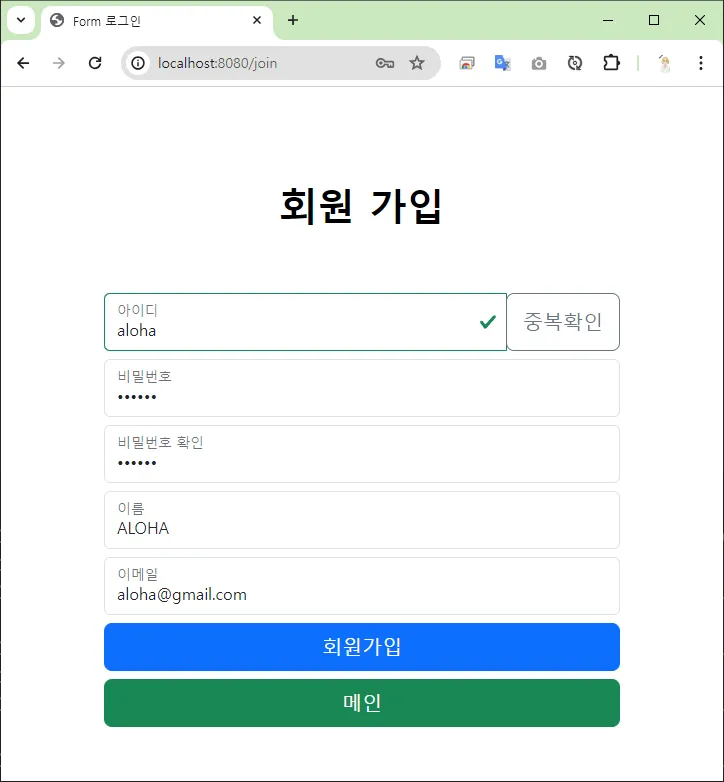

회원 가입 처리  바로 로그인 메인 화면
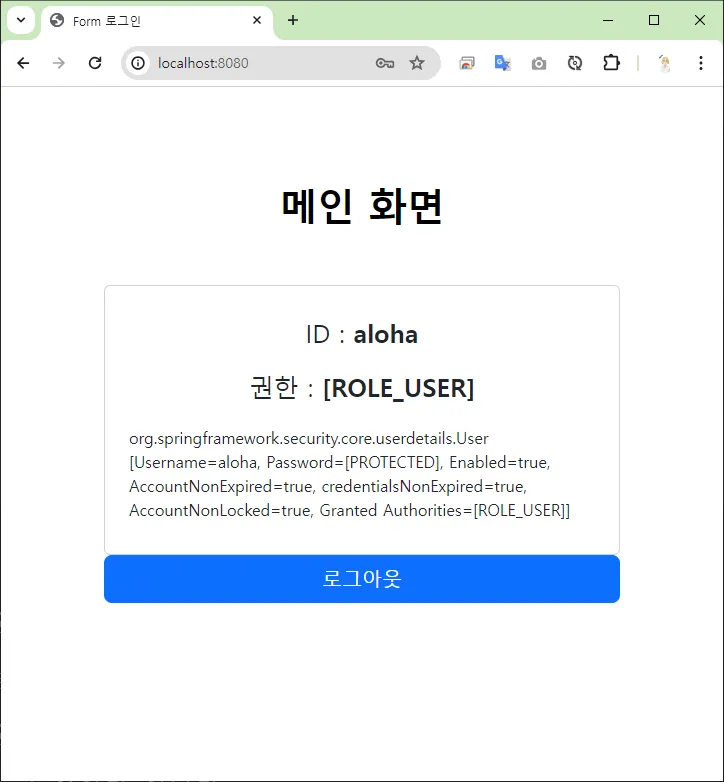
바로 로그인 메인 화면회원 가입 요청 시, 회원 가입이 성공하게 되면 바로 로그인 처리 후 메인 화면으로 이동합니다.
메인 화면
작업 프로세스
1.
프로젝트 생성
2.
프로젝트 설정
3.
스프링 시큐리티 설정
4.
서비스
5.
컨트롤러
프로젝트 생성
build.gradle
spring boot 2.x.x spring security 5.x.xplugins {
id 'java'
id 'war'
id 'org.springframework.boot' version '2.7.17'
id 'io.spring.dependency-management' version '1.0.15.RELEASE'
}
group = 'com.aloha'
version = '0.0.1-SNAPSHOT'
java {
sourceCompatibility = '17'
}
configurations {
compileOnly {
extendsFrom annotationProcessor
}
}
repositories {
mavenCentral()
}
dependencies {
implementation 'org.springframework.boot:spring-boot-starter-security'
implementation 'org.springframework.boot:spring-boot-starter-thymeleaf'
implementation 'org.springframework.boot:spring-boot-starter-web'
implementation 'org.mybatis.spring.boot:mybatis-spring-boot-starter:2.3.1'
implementation 'org.thymeleaf.extras:thymeleaf-extras-springsecurity5'
compileOnly 'org.projectlombok:lombok'
developmentOnly 'org.springframework.boot:spring-boot-devtools'
runtimeOnly 'com.mysql:mysql-connector-j'
annotationProcessor 'org.projectlombok:lombok'
providedRuntime 'org.springframework.boot:spring-boot-starter-tomcat'
testImplementation 'org.springframework.boot:spring-boot-starter-test'
testImplementation 'org.mybatis.spring.boot:mybatis-spring-boot-starter-test:2.3.1'
testImplementation 'org.springframework.security:spring-security-test'
testRuntimeOnly 'org.junit.platform:junit-platform-launcher'
}
tasks.named('test') {
useJUnitPlatform()
}
Java
복사
프로젝트 설정
application.properties
spring.application.name=form-jointologin
# 데이터 소스 - MySQL
spring.datasource.driver-class-name=com.mysql.cj.jdbc.Driver
spring.datasource.url=jdbc:mysql://127.0.0.1:3306/aloha?serverTimezone=Asia/Seoul&allowPublicKeyRetrieval=true&useSSL=false&autoReconnection=true&autoReconnection=true
spring.datasource.username=aloha
spring.datasource.password=123456
# Mybatis 설정
mybatis.configuration.map-underscore-to-camel-case=true
mybatis.type-aliases-package=com.aloha.formjointologin.domain
mybatis.mapper-locations=classpath:mybatis/mapper/**/**.xml
Markdown
복사
스프링 시큐리티 설정
•
 ~/config/CommonConfig.java
 ~/config/CommonConfig.java
@Configuration
public class CommonConfig {
/**
* 🍃 암호화 방식 빈 등록
* @return
*/
@Bean
public PasswordEncoder passwordEncoder() {
return new BCryptPasswordEncoder();
}
/**
* 🍃 AuthenticationManager 빈 등록
* @param authenticationConfiguration
* @return
* @throws Exception
*/
@Bean
public AuthenticationManager authenticationManager(
AuthenticationConfiguration authenticationConfiguration)
throws Exception {
return authenticationConfiguration.getAuthenticationManager();
}
}
Java
복사
서비스
•
UserService.java
•
UserServiceImpl.java
UserService.java
login() 메소드를 추가로 정의합니다.
public interface UserService {
// 로그인
public boolean login(Users user) throws Exception;
// 조회
public Users select(String username) throws Exception;
// 회원 가입
public int join(Users user) throws Exception;
// 회원 수정
public int update(Users user) throws Exception;
// 회원 권한 등록
public int insertAuth(UserAuth userAuth) throws Exception;
}
Java
복사
UserServiceImpl.java
회원 가입 시, 입력한 로그인 아이디와 비밀번호를 통해 로그인 인증 처리가 되도록 구현합니다.
@Service
public class UserServiceImpl implements UserService {
@Autowired
private UserMapper userMapper;
@Autowired
private PasswordEncoder passwordEncoder;
@Autowired
private AuthenticationManager authenticationManager;
@Override
public boolean login(Users user) throws Exception {
// // 💍 토큰 생성
String username = user.getUsername(); // 아이디
String password = user.getPassword(); // 암호화되지 않은 비밀번호
UsernamePasswordAuthenticationToken token
= new UsernamePasswordAuthenticationToken(username, password);
// 토큰을 이용하여 인증
Authentication authentication = authenticationManager.authenticate(token);
// 인증 여부 확인
boolean result = authentication.isAuthenticated();
// 시큐리티 컨텍스트에 등록
SecurityContextHolder.getContext().setAuthentication(authentication);
return result;
}
@Override
public Users select(String username) throws Exception {
Users user = userMapper.select(username);
return user;
}
@Override
public int join(Users user) throws Exception {
String username = user.getUsername();
String password = user.getPassword();
String encodedPassword = passwordEncoder.encode(password); // 🔒 비밀번호 암호화
user.setPassword(encodedPassword);
// 회원 등록
int result = userMapper.join(user);
if( result > 0 ) {
// 회원 기본 권한 등록
UserAuth userAuth = new UserAuth();
userAuth.setUsername(username);
userAuth.setAuth("ROLE_USER");
result = userMapper.insertAuth(userAuth);
}
return result;
}
@Override
public int update(Users user) throws Exception {
int result = userMapper.update(user);
return result;
}
@Override
public int insertAuth(UserAuth userAuth) throws Exception {
int result = userMapper.insertAuth(userAuth);
return result;
}
}
Java
복사
컨트롤러
- ~/controller/HomeController.java
~/controller/HomeController.java ~/controller/HomeController.java
회원 가입 처리 성공 시, 로그인 요청 후 메인 화면으로 이동하도록 코드를 수정합니다.
이전 코드
int result = userService.join(user);
if( result > 0 ) {
return "redirect:/login";
}
Java
복사
수정 코드
// 암호화 전 비밀번호
String plainPassword = user.getPassword();
// 회원 가입 요청
int result = userService.join(user);
// 회원 가입 성공 시, 바로 로그인
if( result > 0 ) {
// 암호화 전 비밀번호 다시 세팅
// 회원가입 시, 비밀번호 암호화하기 때문에,
user.setPassword(plainPassword);
userService.login(user);
return "redirect:/";
}
Java
복사
HomeController.java
@Slf4j
@Controller
public class HomeController {
@Autowired
private UserService userService;
/**
* 메인 화면
* 🔗 [GET] - /
* 📄 index.html
* @return
*/
@GetMapping("")
public String home() {
log.info(":::::::::: 메인 화면 ::::::::::");
return "index";
}
/**
* 회원 가입 화면
* 🔗 [GET] - /join
* 📄 join.html
* @return
*/
@GetMapping("/join")
public String join() {
log.info(":::::::::: 회원 가입 화면 ::::::::::");
return "join";
}
/**
* 회원 가입 처리
* 🔗 [POST] - /join
* ➡ ⭕ 🔄🔐바로 로그인 ➡ /
* ❌ /join?error
* @param user
* @return
* @throws Exception
*/
@PostMapping("/join")
public String joinPro(Users user) throws Exception {
log.info(":::::::::: 회원 가입 처리 ::::::::::");
log.info("user : " + user);
// 암호화 전 비밀번호
String plainPassword = user.getPassword();
// 회원 가입 요청
int result = userService.join(user);
// 회원 가입 성공 시, 바로 로그인
if( result > 0 ) {
// 암호화 전 비밀번호 다시 세팅
// 회원가입 시, 비밀번호 암호화하기 때문에,
user.setPassword(plainPassword);
userService.login(user);
return "redirect:/";
}
return "redirect/join?error";
}
/**
* 아이디 중복 검사
* @param username
* @return
* @throws Exception
*/
@ResponseBody
@GetMapping("/check/{username}")
public ResponseEntity<Boolean> userCheck(@PathVariable("username") String username) throws Exception {
log.info("아이디 중복 확인 : " + username);
Users user = userService.select(username);
// 아이디 중복
if( user != null ) {
log.info("중복된 아이디 입니다 - " + username);
return new ResponseEntity<>(false, HttpStatus.OK);
}
// 사용 가능한 아이디입니다.
log.info("사용 가능한 아이디 입니다." + username);
return new ResponseEntity<>(true, HttpStatus.OK);
}
}
Java
복사